
Imagine a customer clicking “Confirm order” just as your team releases a new version. If the release takes the current servers offline for an update, that request might hang or fail. The customer has to guess whether to try again.
A blue/green deployment brings up a new version (Green) alongside the version serving users (Blue) and switches traffic once Green has passed its checks. On AWS, an Application Load Balancer (ALB) lets customers use the same domain during the switch, and the team can keep Blue running for a possible rollback. This reduces the risk of a release interrupting users. In-flight requests and data already written by Green still need their own plans.
This article builds on Cedric Sanhoudi’s example using Amazon EC2, Elastic Load Balancing, Amazon Route 53, AWS CloudFormation, AWS CodeDeploy, and Amazon CloudWatch. I’ll use a hypothetical order site to show what the team needs to check before sending traffic to Green and before shutting Blue down. Cedric Sanhoudi’s original article
Switch versions at the ALB and keep the domain
Point the website’s Route 53 record at one ALB. A rule on its HTTPS listener sends requests to a target group, the set of servers handling the work. In this example, Blue and Green each have their own EC2 fleet and target group. The team can test Green through a restricted route before changing the production rule. If CloudFormation manages the infrastructure, decide who owns the traffic rule so that a stack update and the deployment pipeline don’t overwrite each other’s changes. ALB listener rules · Route 53 routing to a load balancer
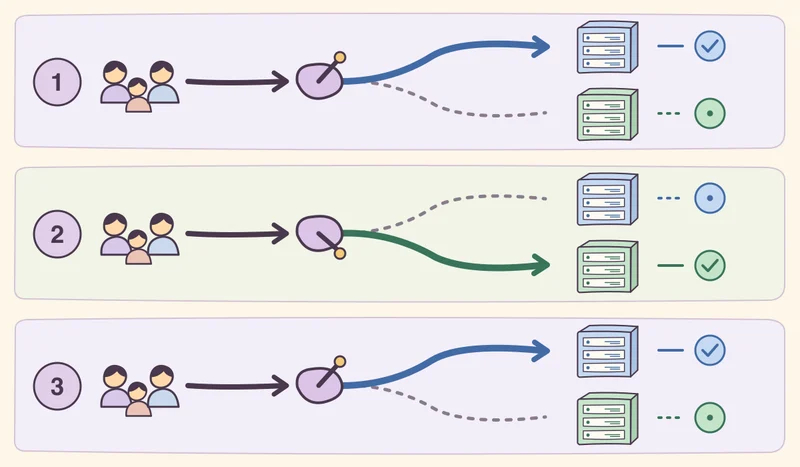
- Get Green ready for real traffic. Give the ALB a fast health endpoint that shows whether the app can accept requests. Separately, use a restricted route to test a business flow such as signing in, placing an order with a test account, and opening the order you just saved. Run those smoke tests outside the frequent health checks, with safeguards against side effects such as charging a card or emailing a customer.
- Shift traffic and measure Green separately. You can switch all at once or start with weights of 95 for Blue and 5 for Green, depending on the risk. Those example weights apply to requests matching the rule. They don’t represent a count of customers or an immediate split when target group stickiness is on. Decide what would stop the release before you start. For example, watch for HTTP 5xx rates or latency climbing above baseline, or fewer orders reaching confirmation. Use CloudWatch for target group signals and have the app report business outcomes by version. Weighted forwarding in ALB · Monitoring CodeDeploy with CloudWatch
- Give existing requests time to finish before shutting down Blue. After Blue stops receiving new requests, allow time for work in progress. When you deregister a target, the ALB’s deregistration delay gives outstanding work time to drain. Set it for the requests your app actually handles, including uploads or long-lived connections. Test how both the app and clients behave, and keep Blue available for as long as your team needs the option to switch back. ALB deregistration delay
ALB weights split requests. If Green’s group is empty or all its targets are unhealthy, the ALB won’t automatically reassign Green’s share to healthy Blue targets. Define a stop condition and rehearse the way back. With CodeDeploy blue/green on EC2, CodeDeploy installs the revision on replacement instances and registers them with the load balancer. The weighted example above changes the ALB rule directly. A CodeDeploy rollback creates a new deployment of a previous revision, and you can configure it to trigger on a failed deployment or a specified alarm. Weighted target group behavior · Blue/green on EC2 · CodeDeploy rollback
Budget capacity and EC2 costs for both fleets during the overlap. How long to keep Blue depends on when problems can surface. For a site that reconciles orders at the end of the day, that may mean waiting for the reconciliation job to finish before retiring Blue.
Can Blue still use the data after a rollback?
Suppose Green introduces a shipping option Blue can’t read. A customer saves an order with the new option, and the team routes traffic back to Blue. Blue may fail to open that order even if every Blue instance passes its health check. The routing change determines which version receives the request. The data Green wrote stays in the database.
When both versions share a database, I’d plan schema changes in expand/contract steps. Add columns or tables while preserving the existing structures. Backfill or migrate data as needed and test that Blue and Green can read and write data the other version understands. The new shipping option can stay behind a feature flag until the rollback window ends. Remove the old structures after confirming that deployed apps and workers have stopped using them. AWS guidance on data and schema changes during blue/green deployments
In a rehearsal, place a test order on Green and have Blue open it and continue the workflow. Also check that sessions survive the switch and that workers don’t process the same job twice. An email or payment request Green already sent won’t be undone by changing the route. Handle duplicate prevention and any corrections separately from the switch.
Onboard domains on a separate schedule
If the system takes on new domains regularly, whether a name like shop-a.example.com or a customer-owned domain, track domain readiness separately from application releases. Activate a domain once DNS, the TLS certificate, and host-based routing are all ready.
- Validate control of the domain and issue a certificate. With AWS Certificate Manager (ACM) DNS validation, the DNS administrator adds the validation CNAME. For names under a domain you control, a certificate for
*.example.comcoversshop-a.example.com. It covers one level only, so include the apexexample.comor a deeper name such asshop-a.eu.example.comseparately when needed. Put additional names in the certificate’s Subject Alternative Name (SAN) list or attach separate certificates. The ALB can select a matching certificate based on the name the client provides through Server Name Indication (SNI). ACM DNS validation · ALB certificates and SNI - Set up the host rule and point DNS to the entry point. Route the hostname to the right app or tenant. If Route 53 hosts the zone, an alias can point both apex and subdomain records to the ALB. DNS resolvers still cache responses according to their time to live (TTL). If you use DNS to move between different ALBs, allow for some users to continue reaching the old one. Route 53 aliases and TTL
- Test the public path before activation. Check that the name resolves as intended, open HTTPS with that hostname to verify the certificate, and request a page or API response that confirms you reached the right tenant. This check can run independently of the next app release.
Choose the tool for what’s changing
| What the team is changing | What the tool handles |
|---|---|
| Application version on EC2 | Two ALB target groups let you test Green separately and retain Blue while you monitor the release. CodeDeploy in-place updates the application across the existing fleet according to the deployment configuration. Leave enough capacity on the instances that keep serving. CodeDeploy deployment types |
| EC2 AMI or launch template | EC2 Auto Scaling Instance Refresh replaces instances in batches according to your healthy-capacity and warm-up settings. Use it for a new machine image or launch-time configuration. How Instance Refresh works |
| Container version on ECS | The native Amazon ECS controller offers rolling, blue/green, linear, and canary strategies. Services with the CodeDeploy controller follow a separate workflow. Check which controller the service uses before choosing a strategy. ECS deployment controllers and strategies |
| API routing | An API Gateway custom domain can map a path such as /orders to a particular API stage. When API Gateway is your public entry point, verify routing there too. API mappings |
| CDN configuration or origin availability | CloudFront continuous deployment sends a share of traffic to a staging distribution so you can test CDN settings before promotion. Origin failover uses a secondary origin under specified conditions for GET, HEAD, and cache-enabled OPTIONS requests. It won’t rescue an order submitted with POST. Origin Shield adds a caching layer to reduce requests to the origin. Continuous deployment · Origin failover · Origin Shield |
| Application on Amazon EKS | The AWS Load Balancer Controller can manage an ALB from an Ingress, while ExternalDNS can update Route 53 records from configured resources. With IP targets and a configured pod readiness gate, Kubernetes waits for the load balancer to see the pod’s target as healthy before treating the pod as ready. EKS load balancing · ExternalDNS · Pod readiness gate |
Before the next release, try one test order. Create it on Green, then switch back to Blue through the same domain. If Blue can open the order and continue the workflow without duplicating it, you’ll have a better basis for deciding how long to keep Blue around and what to fix before sending customers to Green.